WriteHybrid vs Humanizer Pro (2026): Single-Plan Simplicity vs Modes
Side-by-side comparison


Disclosure. I'm Huzefa Abbasi, the founder of WriteHybrid. Humanizer Pro is a competitor, so weigh my view accordingly. This is editorial, based on hands-on use and public pricing checked in June 2026, not a controlled benchmark. Whether either tool clears the detector you face comes down to your specific text, so verify any bypass claim (including mine) on your own draft and checker.
What you're actually choosing between
Humanizer Pro's pitch is simplicity: one plan, one price, no tier-shopping. That's genuinely appealing if you want to avoid decision fatigue and your monthly volume is predictable. The trade-off is the lack of a meaningful free tier and the absence of an upgrade path, what you buy is what you get, with no cheaper rung to drop to and no higher rung to climb.
WriteHybrid is structured differently. It starts with a recurring free tier, scales through Starter and Pro, and breaks the product into Academic, Marketing, Casual, and Technical modes. More choices, but also more ways to match the tool to the task, and a realistic way to test before paying.
Who Humanizer Pro is for: writers with steady monthly volume near its allowance who value one predictable bill and don't need automation or an annual discount. Who WriteHybrid is for: anyone who wants to trial a tool properly before paying, writers who switch between academic and marketing registers, and people who may eventually need API access or a larger word allowance.
Humanizer Pro wins on flat-plan simplicity for steady, high-ish usage; WriteHybrid wins on free-tier testing, a lower entry price, dedicated modes, and an API.
Best for: Writers choosing between one simple flat plan (Humanizer Pro) and a tiered tool with modes and a recurring free tier (WriteHybrid), and who will verify detection on their own checker.
Pros
- +Humanizer Pro: one flat $15/mo plan, no tier decisions
- +Humanizer Pro: 20,000 words is generous at a single price point
- +WriteHybrid: recurring 500-word monthly free tier (no card)
- +WriteHybrid: $9 entry price, four dedicated modes, and API access
Cons
- −Humanizer Pro: only a 200-word lifetime trial to evaluate with
- −Humanizer Pro: no API and no annual discount
- −Humanizer Pro: ~6,000-character cap and a pro-mode upsell mid-output
- −WriteHybrid: lower top-tier word cap than some volume-focused rivals
Key features that actually matter
The marketing for both tools sounds similar, "humanize your text, beat detectors." What actually separates them is in the mechanics. Here's the feature-by-feature breakdown that maps to how you'll really use each one.
Writing modes and tone control
Humanizer Pro offers two modes, basic and pro, with the pro mode upsold partway through the output rather than chosen cleanly at the start. Its pro rewrites lean Latinate and formal, "use" becomes "utilize," "share" becomes "disseminate", which reads heavier and isn't inherently more human. WriteHybrid splits the work into Academic, Marketing, Casual, and Technical modes you choose up front, so the register is a deliberate decision rather than a side effect of how hard the tool rewrites. For someone whose work shifts between essay tone and blog tone, that explicit switch is the practical difference you'll feel most.
Input and word limits
Humanizer Pro caps each paste at around 6,000 characters, roughly 900 words, which is tight. A 2,500-word essay becomes three separate passes, and the seams between them are exactly where rhythm changes and a careful reader, or a detector, notices. WriteHybrid meters by monthly word allowance (10,000 on Starter, 50,000 on Pro) instead of squeezing each paste, so longer documents flow through with fewer artificial breaks to stitch back together afterward.
Free tier and trial
Humanizer Pro gives a single 200-word trial for the life of the account, enough to glimpse the editor, not enough to judge it across different writing. WriteHybrid gives 500 words every month, no card required, which adds up to roughly 6,000 words a year you can spend re-testing on real drafts. The recurring allowance flips the buying psychology: you decide to pay after you already know how the tool handles your kind of work, not before.
API, extensions, and integrations
If you need to automate humanizing, Humanizer Pro rules itself out, there's no API and no published integrations, so it's a manual, in-browser tool only. WriteHybrid offers API access on its $19/month Pro plan, which matters if you want to wire humanizing into a content pipeline or your own tooling. For purely manual, one-document-at-a-time use, neither integration story changes much; for anything programmatic, it's decisive.
Editor UX
Both editors are minimal in the best sense: paste, choose a mode, rewrite. Humanizer Pro's friction isn't layout, it's the mid-output pro-mode upsell, which turns the "free" first pass into a teaser for the paid one. WriteHybrid keeps the mode choice up front and the path to a finished rewrite short, with no interstitial prompt between you and your result.
Support and billing experience
Humanizer Pro runs a 7-day refund window and has no annual plan, so the buying commitment is month-to-month and short-notice. WriteHybrid's 14-day window gives twice the room to decide, and because the free tier never expires you can evaluate without a refund being on the line at all. Neither is a heavyweight enterprise vendor; the difference is simply how much margin for error each gives you.
The editors, side by side
Spec sheets only get you so far. Here's how the two compare on the dimensions that actually decide satisfaction.
Output quality
Humanizer Pro's pro mode produces grammatical, more formal prose, but formality is its whole strategy, and over-formalized text can read as stiff rather than human. The tell is uniformity: when every plain verb is elevated and every sentence reaches for the same register, the result reads as processed even when each sentence is individually fine. WriteHybrid's mode split lets you avoid that trap, Casual where you want lightness, Technical where you need precision preserved, Academic where formality is genuinely appropriate rather than blanket-applied. On academic work specifically, the failure mode to watch in any humanizer is a rewrite that flattens terminology or quietly alters meaning; WriteHybrid's Academic and Technical modes are built to hold those intact, which is the register where a careless rewrite does the most damage to both accuracy and credibility.
Customization
Customization in Humanizer Pro is essentially the basic/pro toggle. WriteHybrid's four modes give more deterministic control over register without asking you to manually re-edit toward a tone. Neither tool offers fine-grained, per-sentence steering, so for both the real customization happens in your own follow-up edits.
Ease of use
For a first run, both are about equally approachable, paste and go. The edge goes to WriteHybrid for not interrupting the result with an upsell, and for letting a brand-new user actually finish a meaningful test on the free tier rather than burning a one-time 200-word sample.
Support and billing
This is where WriteHybrid's longer refund window and non-expiring free tier lower the stakes. Humanizer Pro's month-to-month, 7-day-refund model is fine if it works for you, but it leaves less room to change your mind, and with only a tiny trial beforehand, most of your real evaluation happens after you've paid.
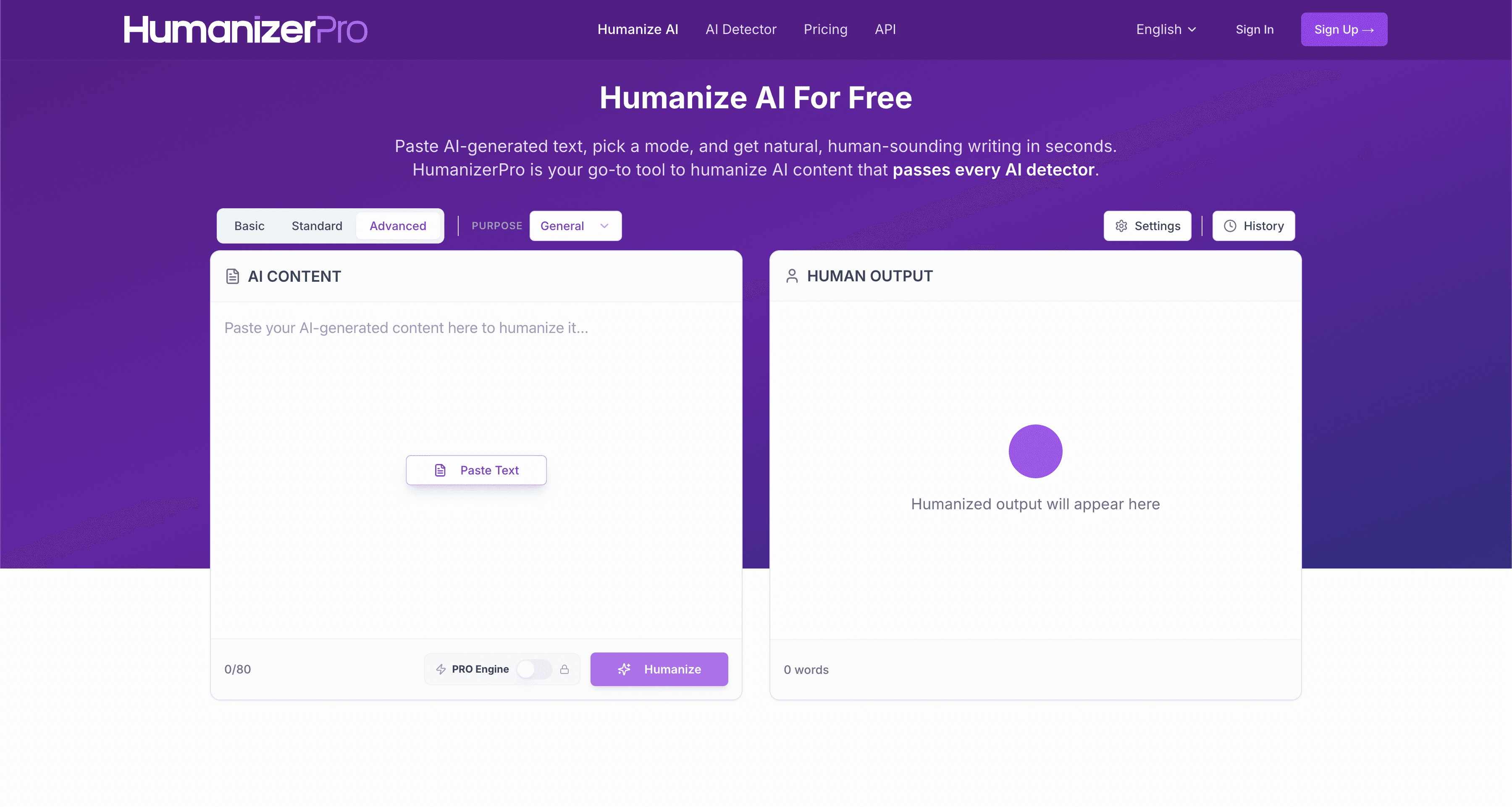
An illustrative rewrite
Humanizer Pro's pro mode tends toward more Latinate, formal substitutions. This shows the style; it is not a detection claim:
Pricing (verified June 2026)
Checked at the live checkout in June 2026. Confirm current numbers before subscribing, as plans change.
| Plan | WriteHybrid | Humanizer Pro |
|---|---|---|
| Free | 500 words/month, recurring, no card | 200 words, one-time (lifetime) |
| Entry paid | $9/mo, 10,000 words (Starter) | $15/mo, 20,000 words (single plan) |
| Higher tier | $19/mo, 50,000 words (Pro, + API) | No higher tier (flat plan) |
| Modes | Academic, Marketing, Casual, Technical | Basic, Pro |
| Refund window | 14 days | 7 days |
On a pure per-word basis, Humanizer Pro is competitive: $15 ÷ 20,000 is about $0.0008 per word, slightly under WriteHybrid Starter's $0.0009 ($9 ÷ 10,000). If you reliably use close to 20,000 words a month and want one predictable bill, that's a fair deal. Where WriteHybrid pulls ahead is the entry cost ($9 versus $15), the longer refund window (14 days versus 7), and the recurring free tier, roughly 6,000 words a year to actually trial the tool on your own drafts, versus Humanizer Pro's single 200-word sample.
The flat plan is worth a second thought, though, because simplicity cuts both ways. If your usage is steady and lands near the 20,000-word line, paying one fixed price beats juggling tiers, a genuine convenience. But if you need a few thousand words some months and far more in others, a single fixed plan either leaves allowance unused or caps you with no cheaper rung to drop to and no higher rung to climb. WriteHybrid's tiers and recurring free words map more naturally onto the uneven, real-world volume where most individual writers actually live.
How to get the best results from Humanizer Pro
If Humanizer Pro is your tool, a short, deliberate workflow gets you a cleaner result:
- Split long drafts at natural breaks, finish a complete idea before the ~900-word cap forces a cut, so each pass keeps its own internal logic.
- Choose between basic and pro on purpose, basic often reads more naturally than the heavier pro substitutions; reach for pro only when the plain rewrite feels too close to the source.
- Watch the formality, if the rewrite turns "use" into "utilize" everywhere, dial it back by hand so the voice stays yours rather than a thesaurus's.
- Verify on your own detector, run the result through GPTZero, Turnitin, Originality.ai, or Copyleaks (whichever your audience uses) instead of trusting the marketing.
- Re-read for meaning drift, formal rewrites occasionally shift nuance; confirm the argument still says what you meant.
The same shape works for WriteHybrid: pick the mode that matches your register up front, run, verify on your own detector, then make a few manual edits to restore anything the rewrite over-smoothed.
A note on Humanizer Pro's reputation
I'd normally include a "what real users say" section here, built from a tool's Trustpilot and Reddit history. In Humanizer Pro's case I'm deliberately not putting a star rating on the page: independent, long-term third-party review coverage of this specific product is thin, and the names in this corner of the market are confusingly similar, so I can't confidently attribute a particular Trustpilot profile to it without risking misinformation. That thinness is itself worth knowing, it's a newer, smaller tool with a limited public track record, which is a reasonable point in favor of trying it only through its free sample first. If you're evaluating it, search its current reviews yourself, check how recent and how numerous they are, and weigh that against tools with a longer, more transparent history before committing to a subscription.
What the late-2025 detector shift means for a flat-plan tool
Detectors don't sit still, and that's worth flagging especially for a single-plan product you can't easily scale up or down with the season. When Turnitin rolled out its late-August 2025 update aimed squarely at humanizer patterns, rewrites that had been sailing through started getting caught, and the whole category, flat-plan tools and tiered ones alike, got noticeably less predictable. GPTZero, Originality.ai, and Copyleaks each retrain on their own timelines, sometimes silently, which means a tool's track record from six months ago tells you little about today.
Here's why that should shape how you read any humanizer's marketing, Humanizer Pro's included: a reassuring claim like "completely undetectable" describes one instant against one detector build. Weeks later, when you paste your own essay against your institution's current checker, the ground has shifted underneath that claim. It's exactly why WriteHybrid stopped publishing headline bypass numbers and instead tells you to test the specific draft you intend to submit, the only signal that reflects the detector you'll genuinely face, on the words you'll genuinely send.
Detection: what we can and can't tell you
Let me be straight about the limits. Humanizer Pro's name promises a premium outcome, but no humanizer, premium-branded or not, can guarantee how a detector will score your particular text. The result turns on the passage itself, its length, the subject matter, and the exact checker and version doing the reading. I won't publish pass-rate figures I can't reproduce on your draft, because a number like that is marketing dressed up as evidence, and a "pro" label changes nothing about that.
What I can offer is qualitative and honest: heavier, more formal output is not the same thing as more human output, and the over-Latinate rewrites Humanizer Pro favors can read as text trying too hard rather than text written by a person. So read every result before you trust it, and run the only check that counts, humanize your own draft and put it through whichever detector your audience actually uses, whether that's Turnitin, GPTZero, Originality.ai, or Copyleaks. Vendor reassurance, mine very much included, is no substitute for testing your real text.
When Humanizer Pro is the better pick
- You want one flat plan and no tier decisions.
- You consistently use close to its 20,000-word allowance every month.
- You value predictable billing over flexibility and don't need an API.
When WriteHybrid is the better pick
- You want to test before paying with a recurring free tier rather than a single 200-word sample.
- You want a lower entry price ($9), a longer refund window, or API access.
- You switch between academic and marketing registers and want explicit modes instead of a pro-mode upsell.
For a brand-new buyer with no existing workflow, WriteHybrid's free tier and lower entry make it the easier tool to try first. If you've already standardized on Humanizer Pro and the flat plan fits your steady volume, the switching cost may not be worth it for you, and either way, you can run the same passage through both before deciding.
Switching between them is low-friction
One underrated point when you're undecided: there's nothing to migrate. Neither tool keeps a document history you'd lose, so moving between Humanizer Pro and WriteHybrid is pure copy-paste. The practical implication is that you don't have to choose on faith. Take three or four representative drafts, a formal essay, a blog post, something technical with terminology you need preserved, and run each through both tools' free options, then check every output on the same detector. An afternoon of that tells you more than any review, including this one, because it uses your writing, your subjects, and the checker you'll actually face. If you're already paying for one and it works, the only switching cost is curiosity; if you're starting fresh, run the bake-off before you enter a card anywhere.
Common mistakes that get humanized text flagged
Most "the humanizer didn't work" stories come down to how the tool was used, not the tool itself. A few patterns cause the majority of avoidable flags:
- Trusting one automated pass and submitting blind. The single biggest mistake. A rewrite is a draft, not a finished document, skipping the read-through is how artifacts and meaning drift survive to submission.
- Forcing one mode across every register. Running a lab report through a casual setting, or marketing copy through a stiff one, produces a mismatch that reads as off to humans before any detector weighs in. This is the specific weakness of a two-mode tool like Humanizer Pro versus four named registers.
- Over-formalizing. Swapping plain words for grander ones throughout, Humanizer Pro's default tendency, doesn't read as more human; uniform elevation is its own kind of tell.
- Letting the tool touch quotes and citations. Rephrased sources introduce accuracy errors that are worse than a detection flag and far harder to defend.
- Checking on the wrong detector. A clean score on a free web checker means little if your institution runs Turnitin. Verify on the tool your audience actually uses.
How to get the most natural output
The tool only does half the work; the rest is how you use it. These evergreen habits help with any humanizer:
- Match the mode to the register. Run academic work in an academic-leaning mode and marketing copy in a looser one; one general setting across everything is what produces tonal mismatch and tell-tale evenness.
- Edit by hand afterward. Your own judgment is the strongest human signal, vary sentence length, restore a concrete example, cut a phrase the rewrite over-polished. Manual touches beat another automated pass.
- Run the result through more than one detector. GPTZero, Turnitin, Originality.ai, and Copyleaks routinely disagree; checking two or three is far more honest than trusting a single score.
- Keep citations and quotations intact. Let the humanizer rephrase your own prose, never your sources, altered quotes and broken references are worse problems than a detection flag.
- Watch for over-formalization. If a rewrite swaps plain words for grander ones throughout, pull it back; reviewers and detectors both notice text that's trying too hard.
Frequently asked questions
Frequently asked questions
Related reading
Try WriteHybrid on your text
Paste AI-generated copy below. 500 humanized words free every month after signup.
Was this page helpful?
Your feedback helps us improve our testing write-ups.